AI SaaS & Automation Services — Let AI Handle the Routine Work
AI that replies to emails, routes tickets, answers chats and runs your repetitive workflows — so your team focuses on customers, not copy-paste.
What AI Assist does in your helpdesk
AI Assist works inside M-Reply, on the same tickets your agents already handle. It takes over the typing and sorting, and leaves the decisions with your team.
Reply suggestions for agents
When an agent opens a ticket, AI Assist drafts a reply from the email thread, similar resolved tickets and your approved templates. The agent edits it if needed and sends it.
Thread summaries
Long conversations with customers and suppliers are summarised in three or four lines, so an agent who picks up a transferred ticket understands it without reading every email.
Classification and routing
New tickets are tagged by topic, urgency and customer sentiment, then routed to the right team, while still respecting each agent’s auto-assign cap.
Automatic replies for routine questions
Questions such as booking status, refund timelines, invoice copies and office hours can be answered at once, but only for topics you allow and only above the confidence level you set.
Closure reason suggestions
When an agent resolves a ticket, AI Assist suggests the matching closure reason, which keeps your reports accurate without extra clicks.
How it looks to your agents
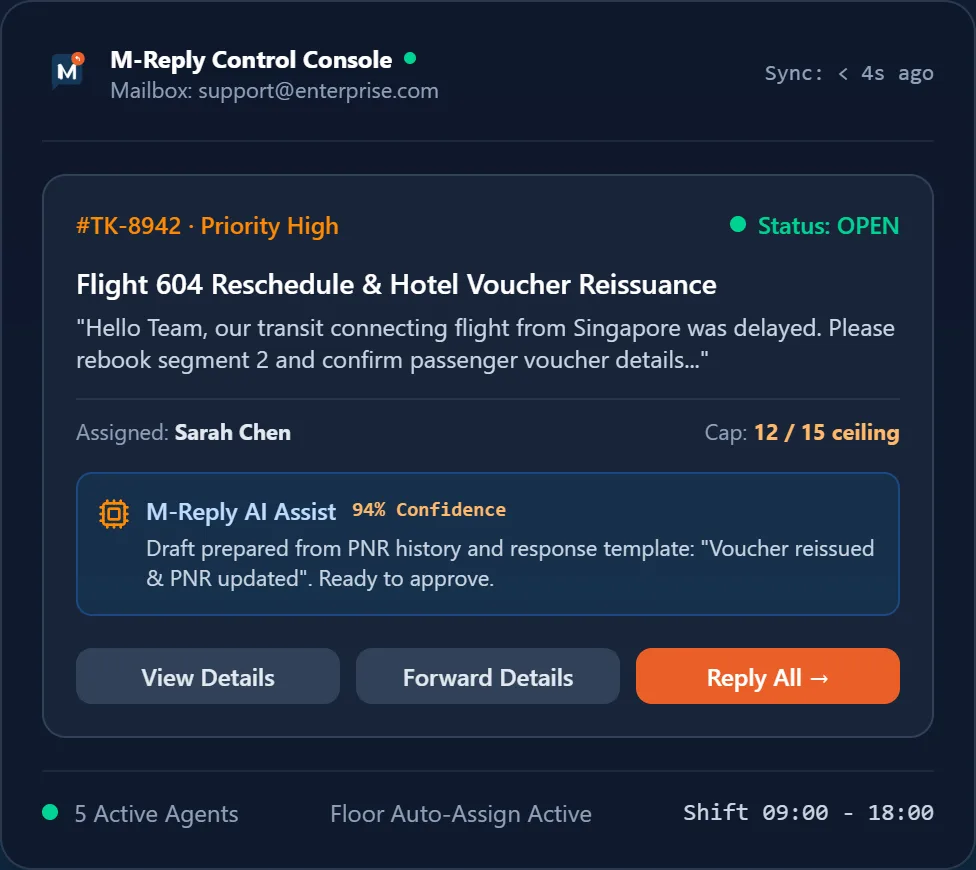
On the left, a draft waiting for the agent to approve. On the right, an automation run from a customer email to a completed action.

Rolled out in three phases
Each phase goes live only after the one before it has proved itself on real customer email.
Phase 1 · Q1 2027
Agent suggestions
Reply drafts and thread summaries. A person reviews and sends every reply. Existing customers get Phase 1 free for 3 months.
Phase 2 · Q2 2027
Routine auto-replies
Automatic answers for an approved list of topics, with a confidence threshold and a daily audit report.
Phase 3 · Q3 2027
Smart routing and triage
Topic classification, urgency scoring and sentiment detection feeding the auto-assign rules.
Safeguards and data privacy
A wrong answer sent to a customer costs more than the time AI saves, so these rules are built in, not optional.
- A person sends every reply unless you switch on auto-reply for a specific topic.
- Auto-reply only runs above the confidence threshold you set; everything else goes to an agent with the draft ready.
- Auto-reply can be switched off per mailbox, per team or per topic in the admin module.
- Every AI action is marked in the ticket history with its confidence score and time.
- Customer emails and your templates are never used to train public AI models.
- Card numbers, CVVs and passport numbers are masked before any text reaches an AI service.
Start with a free AI automation audit
Not sure which of your tickets AI can handle? We find out with you before you pay for anything.
- 1We look at a sample of your recent tickets and group them by topic.
- 2Together we pick the routine topics that are safe to automate, and the ones that must always go to a person.
- 3We set the confidence threshold and the templates AI Assist should draw on.
- 4You see drafts on your own mailbox before anything is switched on for customers.
AI Assist runs on top of the core helpdesk. See all M-Reply features
AI pricing
Add AI Assist to any M-Reply SaaS plan for +₹100 per agent per month
On a perpetual licence: ₹10,000 one-time module
Exclusive of 18% GST
AI Assist questions
Not in Phase 1: every draft is reviewed and sent by an agent. Automatic replies arrive in Phase 2, only for topics you allow and only above the confidence threshold you set. Everything else goes to an agent.
No. Customer emails and your templates are never used to train public AI models, and card numbers, CVVs and passport numbers are masked before any text reaches an AI service.
On the cloud it is ₹100 per agent per month on top of any M-Reply plan. On a perpetual licence it is a ₹10,000 one-time module. Prices exclude 18% GST.
Yes. Automatic replies can be switched off per mailbox, per team or per topic from the admin module.